
Why Your ETL Pipeline Succeeds but Your Data is Still Wrong
Learn why successful ETL pipelines can still produce inaccurate data. Discover common data quality issues, schema drift, duplicate records and monitoring best practices for Azure data platforms.
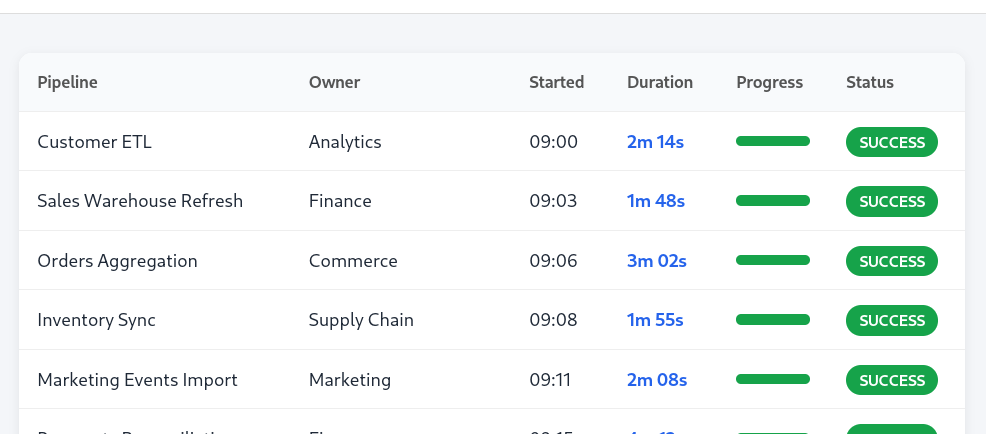
Your data pipeline completed successfully. The dashboards refreshed on time. No alerts were triggered.
So why is your sales report missing yesterday's orders?
One of the biggest misconceptions in data engineering is that a successful ETL pipeline means successful data delivery. In reality, an ETL process can complete without a single error while still producing inaccurate, incomplete or misleading data.
After working with enterprise data platforms across the Microsoft Azure ecosystem, I've found that data quality issues are far more common than infrastructure failures. The challenge isn't keeping pipelines running—it's ensuring the data they produce can be trusted.
In this article, we'll explore some of the most common reasons ETL pipelines silently fail and how to detect problems before your users do.
Pipeline Success Does Not Mean Data Quality
Most orchestration tools, including Azure Data Factory, Synapse Pipelines and Microsoft Fabric Data Factory, report whether an activity completed successfully.
What they don't tell you is whether the data itself is correct.
A pipeline may:
Process the wrong source data
Miss newly arrived records
Load duplicate records
Populate incorrect values
Miss newly added columns
Complete using stale source data
From the orchestration platform's perspective, everything worked exactly as expected. From the business's perspective, the reports are wrong.
1. Missing Data
One of the simplest, and most common, issues is incomplete data. Imagine an overnight pipeline loads customer orders into your reporting database. The pipeline succeeds. However, the application collecting orders experienced delays and only 80% of yesterday's orders were available when the pipeline started. No failures occur, the dashboards refresh, executives begin asking why revenue has dropped by 20%.
The ETL pipeline isn't broken, the source data simply wasn't complete. This can lead to a data engineering spending several hours, of their valuable time, troubleshooting the pipeline before they realize the source data was incomplete unless proper monitoring is in place.
What to monitor
Data freshness
Is the last timestamp in the dataset from 6 hours ago? Then chances are the source data is missing the last 6 hours of data and should trigger an alert.
Record counts compared with historical averages
A Monitoring dashboard could show a moving average of daily records versus the actual. A large deviation from this warrants investigation into missing source data.
Over a certain limit an automated alert can be setup to notify engineers of potential missing data. What this limit is may depend on the variability of your data but 1 or 2 standard deviations from the mean would be a good starting point.
Mitigation strategies
Expected arrival times
Recording the arrival time of the source data is good practice to improve pipeline orchestration. If you’re expecting the data to be available at 23:59 and you run the pipeline at 00:00 then if there’s ever a delay you will be missing data. Tracking the arrival time means you can see how often it’s late and adjust your orchestration accordingly.
In our daily sales data example you could delay this pipeline until 8am so that it will definitely pull in all of yesterdays orders while still having dashboards up to date for when people get to the office.
Pipeline retries
If you need the data to be updated faster then you could have it run every hour (or less) with an upsert pattern (update old rows, insert new rows) when adding to the database. This can get more expensive to run if this level of freshness is not required but ensures the latest data available is always added to your database.
Coupling this strategy with a data freshness alert is a great way to always have the latest data available while also knowing if there’s an issue with the source.
2. Duplicate Records
Duplicates often appear after changes to source systems, retry logic or incremental loading strategies. These problems rarely cause pipeline failures, instead they quietly inflate metrics such as:
Revenue
Order counts
Inventory
Customer numbers
A dashboard showing increasing sales can be far more dangerous than one showing an obvious error.
What to monitor
Duplicate keys
Your tables should have primary keys that cannot be duplicated but you will often have additional key like fields that are only considered duplicates when combined together.
Using the sales record example again, you could have 2 rows with a time stamp like “2026-07-01 10:43:20” and a customer name like “Acme inc.”. Separately these are not duplicates as you could have multiple orders at that exact time or multiple orders from that customer in a single day but it’s very unlikely you will have multiple orders from the same customer at the same second.
Unexpected growth patterns
Similarly to missing data, tracking expected row counts can alert you when you have too much data.
Mitigation strategies
Composite primary keys
Instead of using an auto incrementing ID number as a key almost all databases allow for a composite or compound primary key. This means the example above would be a primary key violation and you would be alerted to a pipeline failure.
Of course you’d probably rather catch this issue and correct it rather than have it fail so you can include logic in your pipeline to check for duplicates in the same way and drop them before it gets to the database.
3. Schema Drift
Applications evolve, developers rename columns, data types change, new fields are introduced. Sometimes these changes are backward compatible and sometimes they aren't.
Your pipeline may still execute successfully while silently ignoring new information or populating columns with incorrect values.
Unless you're actively monitoring for schema changes, these issues often remain unnoticed for weeks.
What to monitor
Added columns
Removed columns
Data type changes
Unexpected NULL values
Mitigation strategies
Governance
It’s not glamorous, but the best way to combat this is with a proper governance strategy. Columns and data types shouldn’t be changed without going through a change management process including approval and testing.
Robust database insertion patterns
If the data is coming from an external system or customer which you have no control over then designing the pipeline in a way that allows them to change the schema, at least somewhat, is often the way to go. As long as they don’t remove the original data you need, the pipeline should be robust enough to keep operating no matter what else they add to it.
Pairing this with monitoring schema drift means you can see if they add any additional data you might want to add while the pipeline continues to operate as needed.
4. Stale Reference Data
Many ETL pipelines depend on lookup tables:
Currencies
Product catalogues
Sales territories
Customer hierarchies
If those reference datasets fail to update, downstream reports may contain perfectly formatted, but completely outdated information. Again, the ETL pipeline reports success, but the data is no longer accurate.
What to monitor
Data freshness
As before, the last update time is important to check but this time the updates might be much less frequent and the alerts should go to the data owner, typically a sales team or account manager in the orders example we’ve been using.
This is more of a data governance solution. You have automated alerts that require data owners to update or confirm records at regular intervals.
Where possible these entries should be automated e.g. currency conversions.
Why Row Counts Aren't Enough
We’ve mentioned comparing row counts versus expected or mean counts but this only catches a small subset of problems and can’t be used in isolation.
For example:
Duplicate rows may increase row counts.
Incorrect values won't affect row counts.
Schema changes won't affect row counts.
Late-arriving updates may be missed entirely.
Incorrect transformations can produce believable, but wrong, results.
Row counts should be treated as one signal, not the only signal.
Building Better Data Quality Checks
A reliable data platform should monitor more than pipeline execution. Consider implementing automated checks for:
Data freshness
Duplicate keys
NULL percentages
Schema changes
Expected value ranges
Historical volume trends
Referential integrity
Business rule validation
These checks provide confidence that the data itself remains trustworthy, not just that the pipeline completed.
Data Quality Is an Ongoing Process
Many organizations invest heavily in building modern Azure data platforms but spend very little time validating the outputs. This can lead to an expensive set of beautiful dashboards that people stop using after a few weeks. Trust in analytics is difficult to earn and remarkably easy to lose.
By treating data quality as a first-class concern rather than an afterthought, organizations can detect issues earlier, reduce operational risk and build greater confidence in their reporting.
Final Thoughts
If your monitoring strategy only tells you whether a pipeline succeeded or failed, you're only seeing part of the picture.
Successful data platforms don't just move data, they continuously validate it.
The organizations with the most trusted reporting aren't necessarily the ones with the most complex architectures. They're the ones that know when their data is wrong before anyone else does.
Need help improving your data platform?
If you're running analytics workloads on Microsoft Azure and would like an independent review of your ETL pipelines, architecture or data quality processes, I'd be happy to help.
Whether you're planning a platform modernization or simply want greater confidence in your reporting, get in touch to discuss how I can support your team.